WHITE COVERS • SOLD AS A PAIR
RV AC Vent Cover Installation, Removal & Fit Help
These friction-fit covers have been tested on the B&B CoolVent 94272. Each white cover measures 4.5 inches in diameter. Check your vent model before fitting a cover. Compatibility with other models has not been confirmed.
Vent manufacturing tolerances vary, so minor fitting may be needed. An identical fit on every vent is not guaranteed.
AC ONLY — NOT FOR HEAT
Use only on air-conditioning outlets. Never use these covers while an outlet supplies heated air, including heat-pump heating. Remove before switching those outlets to heat. Do not cover return-air grilles or intakes.
Follow your RV/AC manufacturer’s airflow requirements. Do not cover outlets when its instructions prohibit it. A cover fitting the vent does not establish whether your AC system permits that outlet to be covered.
Before fitting
- Turn the air conditioning off. Check the system’s instructions for any additional precautions.
- Confirm the vent. The tested model is B&B CoolVent 94272. A similar appearance alone does not confirm compatibility.
- Check the parts. Inspect the cover and vent for damage, deformation, dirt, or anything that may interfere with the fit.
- Clean and dry the contact surfaces. Remove loose dust with a soft cloth. Follow the vent manufacturer’s cleaning instructions and let any cleaned surfaces dry completely.
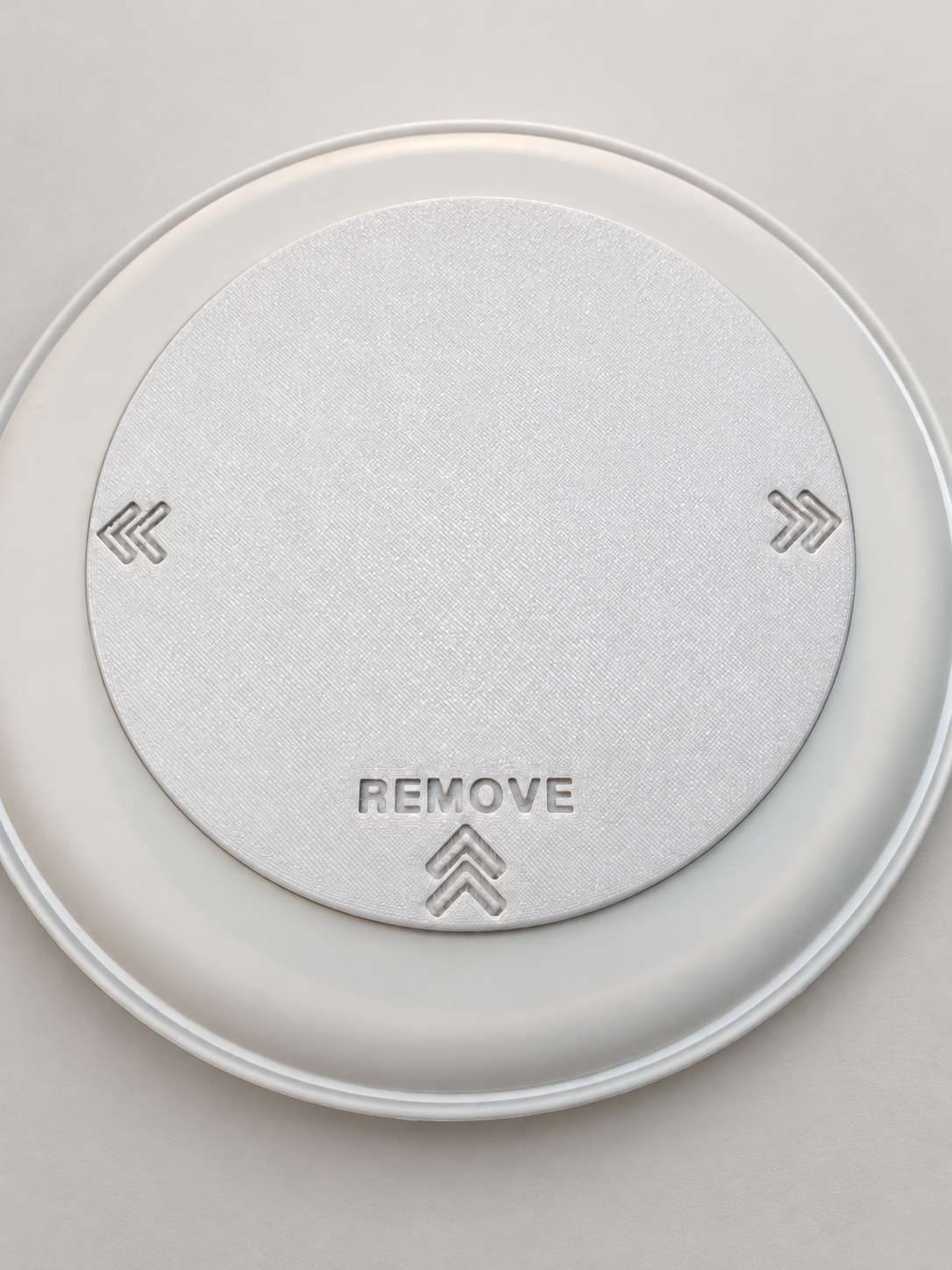
- Locate the removal markings. Each cover has recessed REMOVE lettering and arrows. Make sure you can identify them before fitting.
Install the cover
- Leave the existing vent grille in place.
- Position the cover evenly over the front of the vent.
- Gently press the cover onto the front of the vent. It is held by a friction fit.
- Stop if it will not seat with gentle pressure. Check alignment and use the fitting guidance below before trying again.
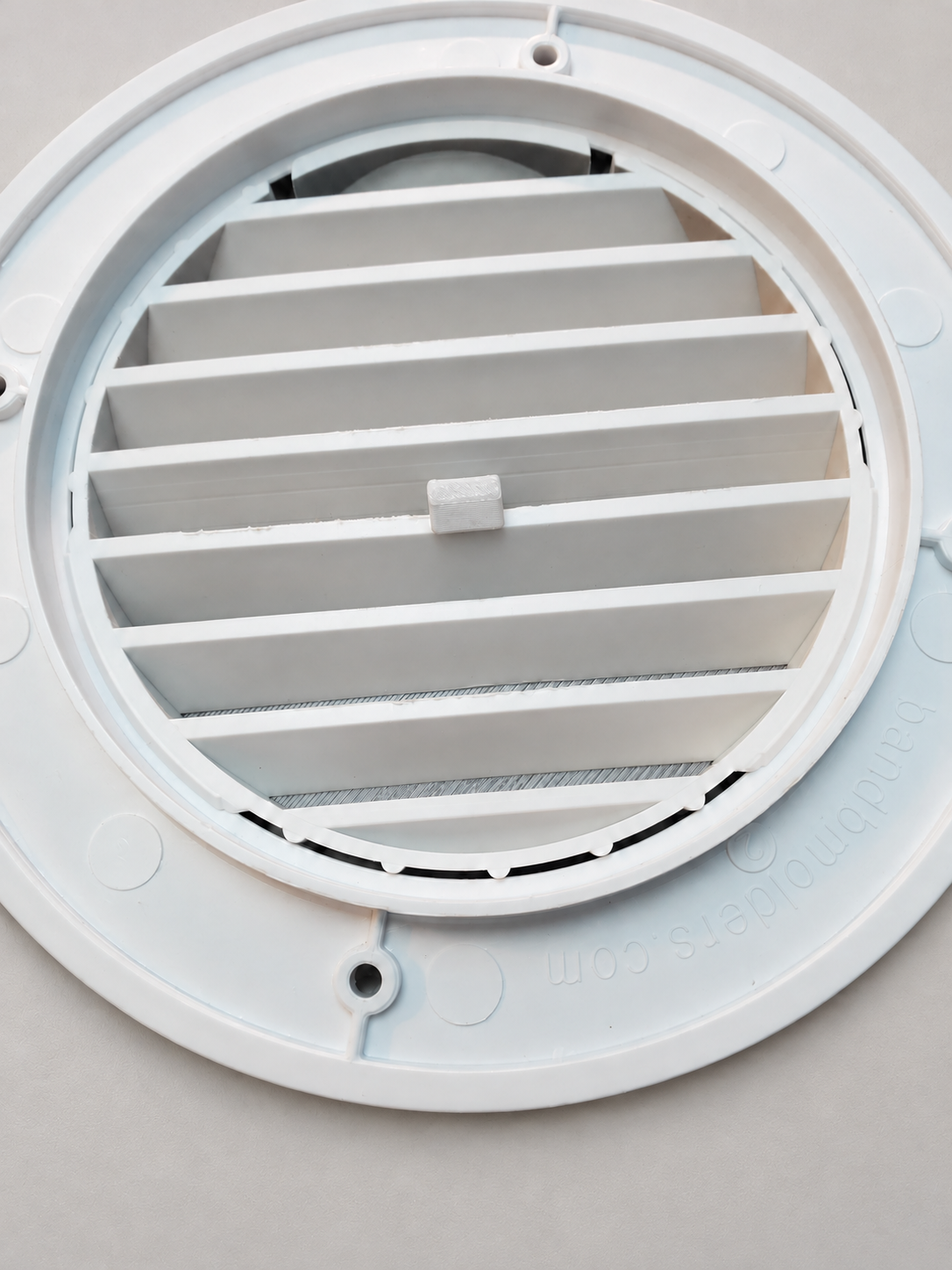
Check the fit
A friction fit should hold the cover securely. Check that the cover is evenly seated and stable. Do not use a cover that is loose, sits unevenly, falls out, or requires excessive force to fit.
If the fit is uncertain, remove the cover and contact us before operating the system with it installed. Physical fit and permitted system airflow are separate checks; both must be suitable.
Adjust the vent opening
Slide the fitted cover side to side to vary how much of the vent opening is exposed. Follow your RV/AC manufacturer’s airflow requirements at every position. If the cover binds or becomes loose as it moves, stop and check the fit.
How to remove a cover
- Turn the air conditioning off.
- Find the recessed REMOVE label and arrows.
- Push in the middle of the cover.
- Push toward the REMOVE arrows, then remove the cover.
If the cover does not release with gentle pressure, stop. Do not force it or pry against the vent. Send us photos so we can help identify the cause.
Friction-fit troubleshooting
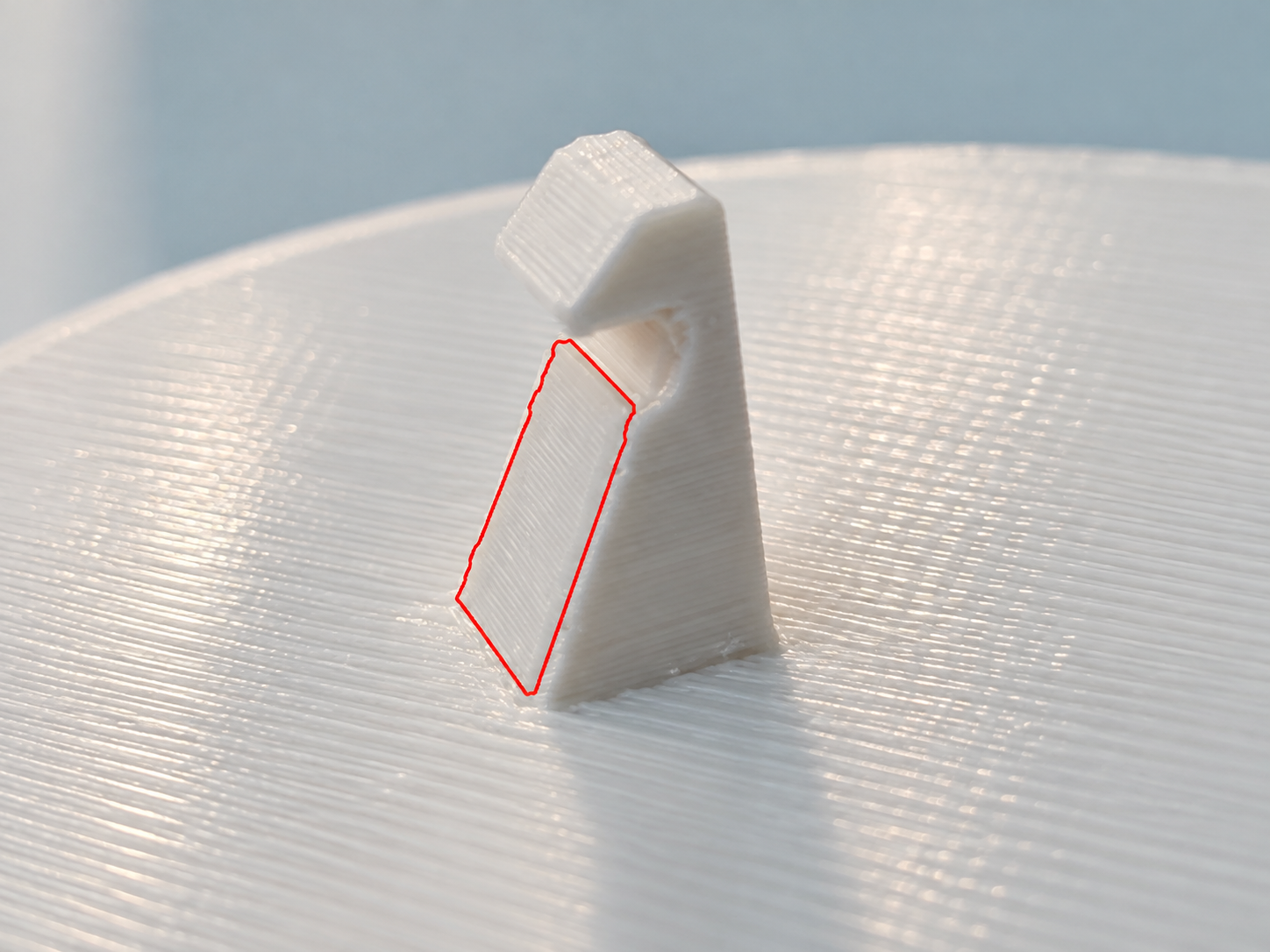
Manufacturing tolerances vary from vent to vent, so some covers may need a small adjustment. Both adjustments below use the same lower sloping contact face on the retaining tab, outlined in red. Remove the cover before making an adjustment.
The cover is too tight or will not seat
Stop before forcing it. Confirm the vent model, check that the cover is aligned evenly, and inspect both parts for dirt, damage, or distortion. Clean and dry the contact surfaces before checking again.
Vent manufacturing tolerances can make the fit tight. Find the lower sloping contact face outlined in red in the close-up above. With the cover removed from the vent, lightly remove a very small amount of material from that face only. Clear away loose debris, then test the fit again. Make one small adjustment at a time; removing too much can leave the cover loose.
Keep the upper hook, the rest of the tab, and the cover face unchanged. Do not modify the vent. If you are unsure which surface is outlined, contact us with photos before removing material.
The cover is loose or falls out
Remove it and leave it off until the cause is resolved. Confirm the vent model and check for a damaged or distorted vent or cover.
Vent manufacturing tolerances can make the fit loose. Find the same lower sloping contact face outlined in red in the close-up above. With the cover removed, add a small amount of tape to that face only, then test the fit again. Add only enough to achieve a secure fit that can still be removed as directed.
Keep the tape on the marked contact face; do not wrap the whole tab or cover the upper hook. If the location is unclear or the fit remains unreliable, contact us with photos.
The cover sits unevenly
Remove it, inspect the contact surfaces, and check for debris or damage. Do not force one edge to compensate for the other. If an even fit cannot be achieved, contact us before using it.
The cover is difficult to remove
Make sure you are following the recessed REMOVE arrows: push in the middle, push toward the arrows, then remove. Stop if it does not release gently. Do not use the vent as a leverage point for a tool.
How much adjustment should I make?
Make the smallest change possible at the designated area, then test the fit again. Do not make several changes at once. Stop when the cover is secure and can be removed as directed. If you are unsure about the location or amount, contact us before continuing.
Common questions
What is included?
One pair of white covers, each 4.5 inches in diameter. The covers are sold only as a pair. Vent assemblies are not included.
Will these fit any round RV vent?
No universal fit is claimed. These covers have been tested on B&B CoolVent 94272. Vent manufacturing tolerances vary, so minor fitting may be needed even on the tested model. Check your vent model before ordering or installing.
Can I use them when the same vents also supply heat?
These covers are for AC only, not heat. Never use them while an outlet supplies heated air, including heat-pump heating. Remove the covers before switching those outlets to heat. During cooling, follow the airflow requirements from your RV/AC manufacturer.
How many outlets can I cover?
There is no universal number. Your RV/AC manufacturer’s airflow requirements determine whether outlets may be covered. Do not cover outlets if its instructions prohibit it, and do not assume that a compatible physical fit means covering is permitted.
Are the lettering and arrows raised?
No. The REMOVE lettering and arrows are recessed into the cover.
Need help with your fit?
Contact us through the store where you purchased the covers. Include:
- Your order number.
- The vent’s model or part number.
- Clear photos of the vent, the cover, and the area where the fit is a problem.
- Whether the cover is too tight, too loose, uneven, or difficult to remove.
- Vent opening measurements, if available, with a photo showing where you measured.
Leave the cover off while a fit issue is unresolved.